





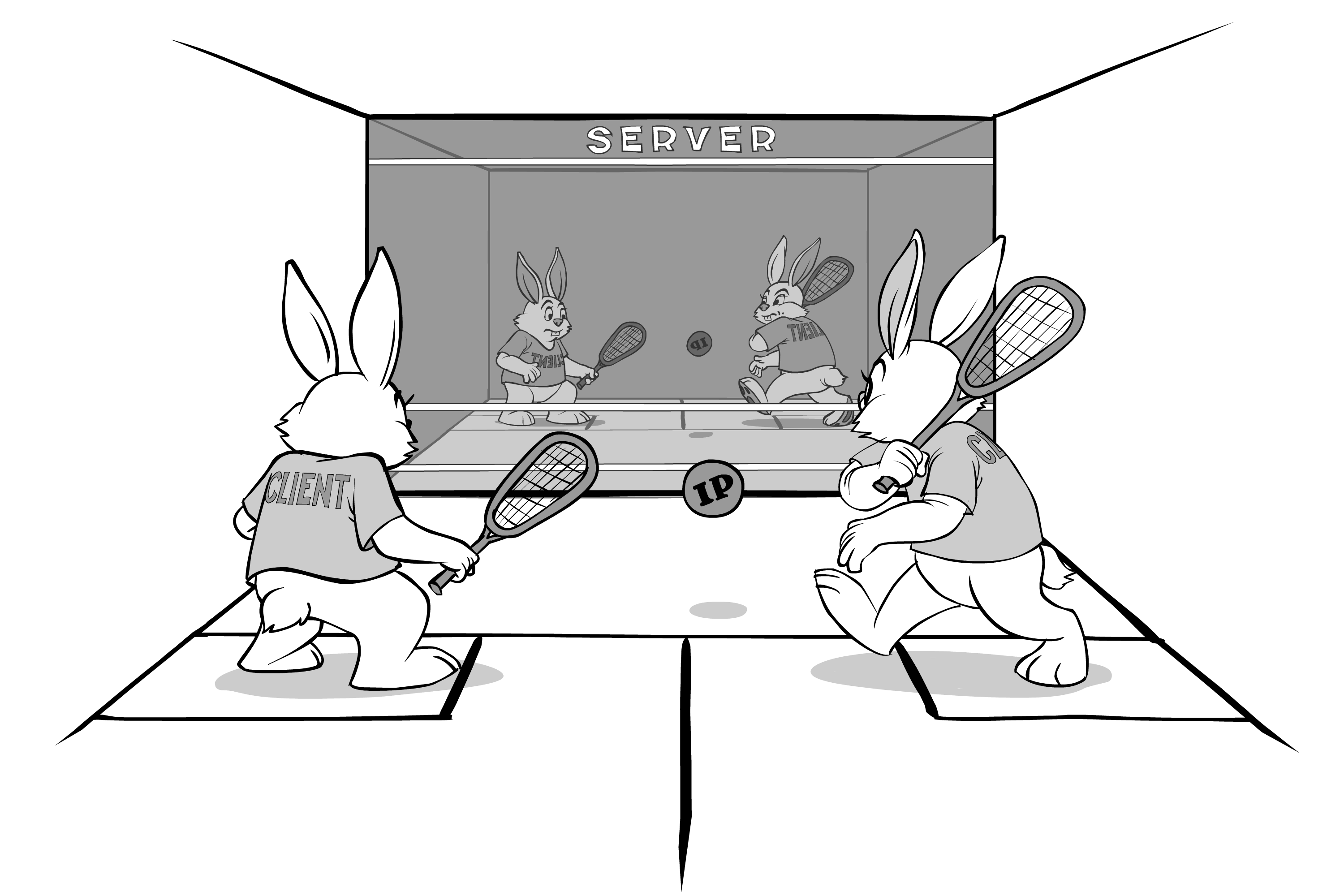
Now we're ready to discuss what the MMOs are all about – protocols. However, don't expect me to discuss much of the lava-hot “UDP vs TCP” question here – we're not there yet (most of this question, alongside with the ways to mitigate their respective issues, will be discussed in detail in Chapter [[TODO]]). For now we need to understand the principles behind the MMO operation; mapping them to specific technologies is a related but different story.
Data Flow Diagram, Take 1
Note that if your game is fast-paced (think MMOFPS or MMORPG), the approach described with regards to Take 1 Diagram, won't allow you to produce a game which doesn't feel "sluggish" (it will work, but won't feel responsive). However, please keep reading, as we will discuss the problems with this simple diagram, and ways to deal with them, later.
To see what the MMOG protocols are about, let's first draw a very simple data flow diagram for a typical not-so-fast MMO. As it was discussed in Chapter III, our server needs to be authoritative. As a result, the usual flow in a simplistic case will look more or less as follows:
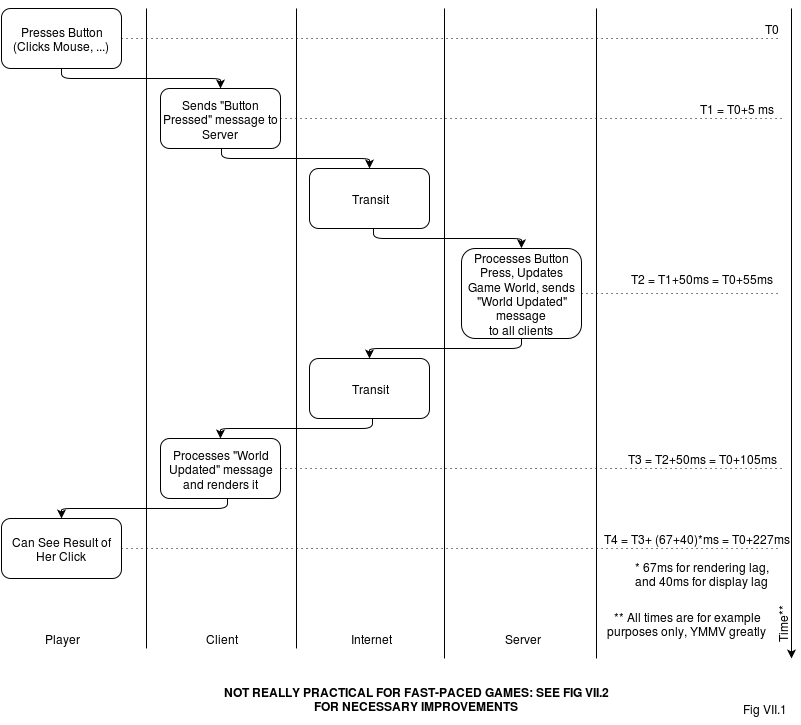
Despite visual simplicity of this diagram, there are still a few things to be mentioned:
- All the specific delay numbers on the right side are for example purposes only. Your Mileage May Vary, and it may vary greatly. Still, the numbers do represent a rather typical case.
- It may seem that the client here is pretty “dumb”. And yes, it is; most of the logic in this picture (except for rendering) resides on the server side. However, in most of the games there are some user actions which cause client-only changes (and don't cause any changes to the server-side game world), they can and should be kept to the client. These are mostly UI things (like “show/hide HUD”, and usually things such as “look up”), but for certain games this logic can become rather elaborated. Oh, and don't forget stuff such as purchases etc.: if you keep them in-game (see Chapter [[TODO]] for details), it will require quite a lot of dialogs with an associated client-side logic, and these (select an item, info, etc. etc.) are also purely client-side until the player decides to go ahead with the purchase.
Last but certainly not least: for fast-paced games, there is one big problem with the flow shown on this diagram, and the name of the problem is “latency”. It is obvious that for this simplistic data flow, the delay between player pressing a button, and her seeing results of herself pressing the button (which is known as “input lag”), will be at least so-called round-trip-time (RTT) between client and server (which is shown as 100ms for Fig VII.1, see "RTT" section below for more discussion regarding RTT). In practice, though, there is quite a bit added to the RTT, and for our example on Fig VII.1, 100ms RTT resulted in 227 overall delay. And if this delay (known as "input lag", which is admittedly a misnomer) exceeds typical human expectations, the game starts to feel “laggy”, all the way down to “outright unplayable” 🙁. Let's take a closer look at these all-important input lags. For fast-paced games, there is one big problem with the flow shown on this diagram, and the name of the problem is “latency” (a.k.a. 'input lag')
Input Lag: the Worst Nightmare of an MMO developer
Note: if your game is slow- or medium-paced (including casino-like games such as poker), you can safely skip this section.
As noted above, for MMOs a lot of concerns is about relation between two times: input lag, and user expectations about it. Let's consider both of them in detail.
Input Lag: User Expectations
First, let's take a look at user expectations, and of course, user expectations are highly subjective by definition. However, there are some common observations which can be obtained in this regard. As a starting point, let's quote Wikipedia Wikipedia.InputLag:
"Testing has found that overall "input lag" (from controller input to display response) times of approximately 200 ms are distracting to the user.”
Let's take this magic number of 200ms as a starting point for our analysis (give or take, the number is also confirmed in several other sources[[TODO: add links]], and is also consistent with human reaction time LippsEtAl, so it is not just Wikipedia taking it out of blue).
On the other hand, let's note that strictly speaking, it is not exactly 200ms, and it certainly varies between different genres. Still, even for the most time-critical games the number below 100-150ms is usually considered “good enough”, and for any real-time interaction the lag of 300ms will be felt easily by lots of your players (though whether it will feel “bad” is a different story). To be more specific, for the remaining part of this Chapter let's consider two sample games: one being a simple OurRPG with input lag tolerance of 300 ms (let's assume it doesn't have fights and is more about social interactions, which makes it less critical to delays), and another game being OurFPS with input lag tolerance of 150ms.
These 150-300ms of input lag tolerance is just a fact of life (closely related to human psychology/physiology/etc.) so that we cannot really do much about it.
Let's also note that these 150-300ms of input lag tolerance is just a fact of life (closely related to human psychology/physiology/etc.) so that we cannot really do much about it.
Input Lag: How Much We Have Left for MMO
The very first problem we have is that there are several things eating out of this 200ms allocation (even without our MMO code kicking in). This is lag introduced by game controller, lag introduced by rendering engine (that depends on many things, including such things as the size of render-ahead queue), and display lag (mostly introduced by LCD monitors).
Typical mouse lag is 3-6ms TomsHardware.GraphicsCardsMyths, less for gaming mice. For our purposes, let's account for any game controller lag as 5ms.
Typical rendering engine lags vary between 50ms and 150ms. 50ms (=3 frames at 60fps), is rather tricky to obtain, and is not that common, but still possible. More common number (for 60fps games) is 67ms (4 frames at 60fps), and 100-133ms are not uncommon either Leadbetter2009.
Typical display lag (not to be confused with pixel response time, which is much lower and is heavily advertised, but it is not the one that usually kills the game) starts from 10ms, has a median of a kind around 40ms, and goes all the way to 100ms DisplayLag.Display-Database.
It means that out of the original 150-300ms we originally had, we need to subtract a number from 60ms to 255ms. Which means that in quite a few cases the game is already lagging even before an MMO and network lag has kicked in 🙁 .
To be a bit more specific, let's note that we cannot really control such things as mouse lag and display lag; we also cannot realistically say “hey guys, get the Absolutely Best Monitor”, so at least we should aim for a median player with a median monitor. Which means that we should assume that out of our 150-300 ms, we need to subtract around 45ms (5ms or so for game controller/mouse, and 40 for a median monitor).
Now let's take a look at the lag, introduced by a rendering engine. Here, we CAN make a difference. Moreover, I am arguing that
for MMOs, rendering latencies are even more important than for single-player games
The point here is that for a single-player game, if we'd manage to get overall input lag say, below 100ms, it won't get that much of an improvement for the player (as long as it is fair to all the players), as this number is below typical human ability to notice things. However, for an MMO, where we're much closer to the magic 150-300ms because of RTTs, effects of the reduced latency will be significantly more pronounced. In other words, the difference between 100ms and 50ms for a single-player game won't feel the same as the difference between 200ms and 150ms for an MMO.
For the purposes of our example calculation, let's assume we've managed to get a rendering engine with a pretty good 67ms latency. This (combined with 45ms mentioned above) means that we've already eaten 112ms out of our 150-300ms initial allocation. And even if everything else will work lightning fast, we need to have RTT<40ms for OurFPS, and RTT<180ms for OurRPG.1
1 in practice, it is even worse, see further discussion in “Accounting for Packet Losses and Jitter” section below☹️
Input Lag: Taking a Bit Back
One trick which MAY be used to get a bit of "input lag" back is by introducing client-side animations. If, immediately after the button press, client starts some animation (or makes some sound, etc.), while at the same time sending the request to the server side - from end-user perspective the length of this animation is "subtracted" from the "input lag". For example, if in a shooter game you'll add a 50ms trigger pulling animation (while sending the shot right after the button press) - from player's perspective, the "Input Lag" will start 45ms later, so we'll get these 45ms back. Adding tracers to the shoots is known to create a feeling that bullets travel with limited speed, buying another 3 or so frames (50 ms) back (however, tracers are more controversial at least at close distances).
While capabilities of such tricks are limited, when dealing with the Input Lag, every bit counts, so you should consider if they are possible for your game.
[[TODO? - add another diagram to illustrate it and/or add it to further diagrams?]]
RTT
Now let's take a look at that RTT monster,2 which is the worst nightmare for quite a few of MMO developers out there. RTT (=”Round-Trip Time”) depends greatly on the player's ISP (and especially on the “last mile”), but even in a very ideal case, there are hard limits on “how low you can go with regards to RTT”. Very roughly, for RTT and, depending on the player's location, you can expect ballpark numbers shown in Table VII.1 (this is assuming the very best ISPs etc.; getting worse is easy, getting significantly better is usually not exactly realistic):
Player Connection | RTT (not accounting for “last mile”) |
On the same-city “ring” or “Internet Exchange” as server (see Wikipedia.InternetExchanges, but keep in mind that going out of the same city will increase RTT) | ~10-20 ms |
Inter-city, cities separated by distance D | At the very least, 2*D/ cfib (cfib being speed of light within optical fiber, roughly cvacuum/1.5, or ~2e8 m/s). Practically, add around 20-50ms depending on the country. |
Trans-US (NY to SF) | At the very least (limited by cfib) ~42 ms; in practice – at least 80 ms. |
Trans-atlantic (NY to London) | At the very least (limited by cfib) ~56 ms Grigorik2013; in practice – at least 80 ms. |
Trans-pacific (LA to Tokyo) | At the very least (limited by cfib) ~90 ms, in practice – at least 120ms. |
A Really Long One (NY to Sydney) | At the very least (limited by cfib) ~160 ms Grigorik2013; in practice – at least 200 ms. |
In addition, you need to account for player's “last mile” as described in Table VII.2:
Additional “last-mile” RTT | |
Added by player’s “last mile”: cable | Grigorik2013 reports ~25ms, my own experience for games is about like 15-20ms3 |
Added by player’s “last mile”: DSL | Grigorik2013 reports ~45ms, my own experience for games is more like 20-30ms3 |
Added by player’s Wi-Fi | ~2-5 ms |
Added by player’s concurrent download | Anywhere from 0 to 300-500ms |
Several things to keep in mind in this regard:
- If your server is sitting with a good ISP (which it should), it will be pretty close to the backbone latency-wise. This means that in most of “good” cases, real player's latency will be one number from Table VII.1, plus one or more numbers from Table VII.2 (and server's “last mile” latency can be written off as negligible); it is still necessary to double-check it (for example, by pinging from another server).
- The numbers above are for hardware servers sitting within datacenters. Virtualized servers within the cloud tend to have higher RTTs (see Chapter [[TODO]] for further discussion), with occasional delays (when your cloud neighbour suddenly started to eat more CPU/bandwidth/...) easily going into multiple-hundreds-of-ms range ☹️ . BTW, you can get cloud without virtualization (which will eliminate these additional delays), more on it in Chapter [[TODO]].
- LAN-based games (with wired LAN having RTTs below 1 ms) cannot be really compared to MMOs latency-wise. If your MMO needs comparable-to-LAN RTT latency to be playable – sorry, it won't happen (but see below about the client-side prediction which may be able to alleviate the problem in many cases, though at the cost of significant complications)
- No, CDN won't work for games (at least not those traditional CDNs which are used to improve latencies for web sites)
And while we're at it, three things that you'll certainly need to tell to your players with regards to RTT/latency:
no, better bandwidth doesn't necessarily mean better latency (this will be necessary to tell answering questions such as “how comes that as soon as I've got better 30Mbit/s connection, your servers started to lag on me?”) No, better bandwidth doesn't necessarily mean better latency
 - it is easy to show whatever-number-we-want in the client as a “current latency” number, but comparisons of the numbers reported by different games are perfectly pointless (this actually is a Big Fat Argument to avoid showing the numbers at all, though publishing the number is still a Business Decision).
- When saying “it was much better yesterday”, are you sure that nobody in your household is running a huge download?
2 this monster is quietly hiding behind the curtain of LAN until you start to test with real-world RTTs
3 the difference can be attributed to downloads which tend to cause longer RTTs; also gamers tend to invest in better connectivity
Back to Input Lag
Ok, from Table VII.1 and Table VII.2 we can see that in the very best case (when both your server and client are connected to the very same intra-city ring/exchange, everything is top-notch, last mile is a non-overloaded cable, no concurrent downloads running in the vicinity of the client while playing, etc. etc.) - we're looking at 35-45ms RTT. When we compare it to our remaining 40-180ms, we can say “Great! We can have our cake and eat it too, even for OurFPS!” And it might indeed work (though it won't be that bright, see complications in "Accounting for Losses and Jitter" subsection below). On the negative side, it means having a server on each and every city exchange, and losing (or at least penalizing) lots of players who don't have this kind of connectivity 🙁 .
Within the same (large) country, the best-possible RTT goes up to around 80-100ms.
Within the same (large) country, the best-possible RTT goes up to around 80-100ms. Which means that with a simple diagram on Fig VII.1 we MIGHT be able to handle OurRPG, but not OurFPS (though again, see complications below). Country-specific servers are very common, and are not that difficult to implement and maintain, but they still restrict flexibility of your players (and also can have adverse effects on “player critical mass” [[TODO! add discussion on "critical mass" to Chapter I]]. Single-continent servers (with RTTs in the range of 100-120ms) are close cousins of country-specific ones, and are also frequently used for fast-paced games.
Purely geographically, for US the best server location for a time-critical game would be somewhere in Arkansas 🙂 . More realistically (and taking into account real-world cables), if trying to cover whole US with one single server, I'd seriously consider placing it at a Dallas or Chicago datacenter, it would limit the maximum RTT while making the games a bit more fair.
If you want a world-wide game, then maximum-possible RTT goes up to 220ms. Worse than that, there is also significant difference for different players. While simple data flow shown on Fig VII.1 might still fly for a relatively slow-paced world-wide RPG (think Sims), but MMOFPS and other combat-related things are usually out of question.
Data Flow Diagram, Take 2: Fast-Paced Games Specifics
Note: if your game is slow- or medium-paced (including casino-like games such as poker), you can safely skip this section.
Note 2: if your game is fast-paced (think MMOFPS or MMORPG), the approach described with regards to Take 2 Diagram, still isn't likely to produce a game which doesn't feel "laggy". However, please keep reading, as we will discuss the remaining problems, and the ways to deal with them, in Take 3.
Ok, our calculations above seem to show that we can get away with a simplistic diagram from Fig. VII.1 even for some of fast-paced fps-based games.
Well, actually, we cannot, at least not yet: there is one more important network-related complication which we need to take into account. This is related to mechanics of the Internet (and to some extent - to the mechanics of simulation-based games).
Internet is Packet-Based, and Packets can be Lost
First of all, let's talk about mechanics of the Internet (only those which we need to deal with at the moment). I'm not going to go into any details or discussions here, let's just take it as an axiom that
when the data is transmitted across the Internet, it always travels within packets,@br@and each of these packets can be delayed or lost
This stands regardless of exact protocol being used (i.e. whether we're working on top of TCP, UDP, or something really exotic such as GRE). In addition, let's take as another axiom that
each of these packets has some overhead
For TCP the overhead is 40+ bytes per packet, for UDP – it is usually 28 bytes per packet (that's not accounting for Ethernet headers).
For TCP the overhead is 40+ bytes per packet, for UDP – it is usually 28 bytes per packet (that's not accounting for Ethernet headers, which add their own overhead). For our current purposes, exact numbers don't matter too much, let's just note that for small updates they're substantial.
Now let's see how these observations affect our game data flow.
Cutting Overhead
The first factor we need to deal with, is that for a fast-paced game sending out a world update in response to each and every input is not feasible. This (at least in part) is related to the per-packet overhead we've mentioned above. If we need to send out an update that some PC has started moving (which can be as small as 8 bytes), adding overhead of 28-40 bytes on top of it (which would make 350-500% overhead) doesn't look any good.
That's at least one of the reasons why usually simulation is made within a pretty much classical “game loop”, but with rendering replaced with sending out updates:
while (true) {
  TIMESTAMP begin = current_time();

  process_input();
  update(); // update() normally includes all the world simulation, including NPC movements, etc.
  post_updates_to_clients();
  // Here, we're effectively combining all the world updates
  // which occurred during the current 'network tick'
  // into as few packets as possible, effectively cutting overhead

  TIMESTAMP elapsed = current_time() - begin;
  if (elapsed < NETWORK_TICK) {
    sleep(NETWORK_TICK - elapsed);
  }
}
With this approach, we're processing all the updates to the “game world” one “network tick” at a time. Size of the “network tick” varies from one game to another one, but 50ms per tick (i.e. 20 network ticks/second) is not an uncommon number (though YMMV may vary significantly(!)).
Note that on the server-side (unlike for client-side game loop from Chapter V) the choice of different handling for time steps is limited, and it is usually the variation above (the one waiting for remainder of the time until the next "tick") which is used on the server-side. Moreover, usually it is written in ad-hoc-FSM (a.k.a. event-driven) style, more or less along the following lines:
void MyFSM::process_event(TIMESTAMP current_time, const Event& event) {
  //'event' contains ALL the messages that came in but are not processed yet

  process_input(event);
  update();
  post_updates_to_clients();

  // Schedule the next invocation of process_event after the NETWORK_TICK interval
  post_timer_event_to_myself(SLEEP_UNTIL, current_time + NETWORK_TICK);
}
Accounting for Losses and Jitter
So far so good, but we still didn't deal with those packet losses and sporadic delays (also known as “jitter”).
If we will stay within the simple schema shown on Fig. VII.1 – then each lost packet will mean visible (and unpleasant) effects: on player's screen everything will stop for a moment, and then “jump” to the correct position when the next packet arrives.
If we won't do anything (and will stay within the simple schema shown on Fig. VII.1) – then each lost (or substantially delayed) packet will mean visible (and unpleasant) effects on the player's screen: everything will stop for a moment, and then “jump” to the correct position when the next packet arrives.
To deal with it we need to introduce a buffer on the client side, so that if the packet traveling from server to the client is lost or delayed, we have time to wait for it to arrive (or for its retransmitted copy, sent in case of packet loss, to arrive). This is very much the same thing which is routinely done for other jitter-critical stuff such as VoIP.
The delay we need to introduce with this buffer, depends on many factors, but even with the most aggressive UDP-based algorithms (such as the ones which re-send the whole state on each network tick, or the one described at the very end of GafferOnGames.DeterministicLockstep, see Chapter [[TODO]] for further discussion), the minimum we can do is having a buffer of one network tick to account for one-lost-packet-in-a-row. In practice, the buffer of around three “network ticks” is usually desirable (that's for really aggressive retransmit policies mentioned above).
If going TCP route, we're speaking about retransmit delays of the order of RTT, which will usually force us to have buffer delays of the order of N*RTT (like 3*RTT) ☹️, which is substantially higher. These delays-in-case-of-packet-loss are one of the Big Reasons why TCP is not popular (to put it mildly) among the developers of fast-paced games. More on it in Chapter [[TODO]].
One thing which should be noted in this regard, is that to some extent this buffer MAY be somewhat reduced due to render-ahead buffering used by the rendering engine. It would be incorrect, however, to say that you can simply subtract the time of render-ahead buffer by the rendering engine (by default 3 frames=50ms for DirectX) from the time which we need to add for RTT purposes. Overall, this is one of those things which you'll need to find out for yourself.
Take 2 Diagram
These two considerations discussed above (one related to overhead and game loop, and another related to client-side buffer) lead us to the diagram on Fig VII.2: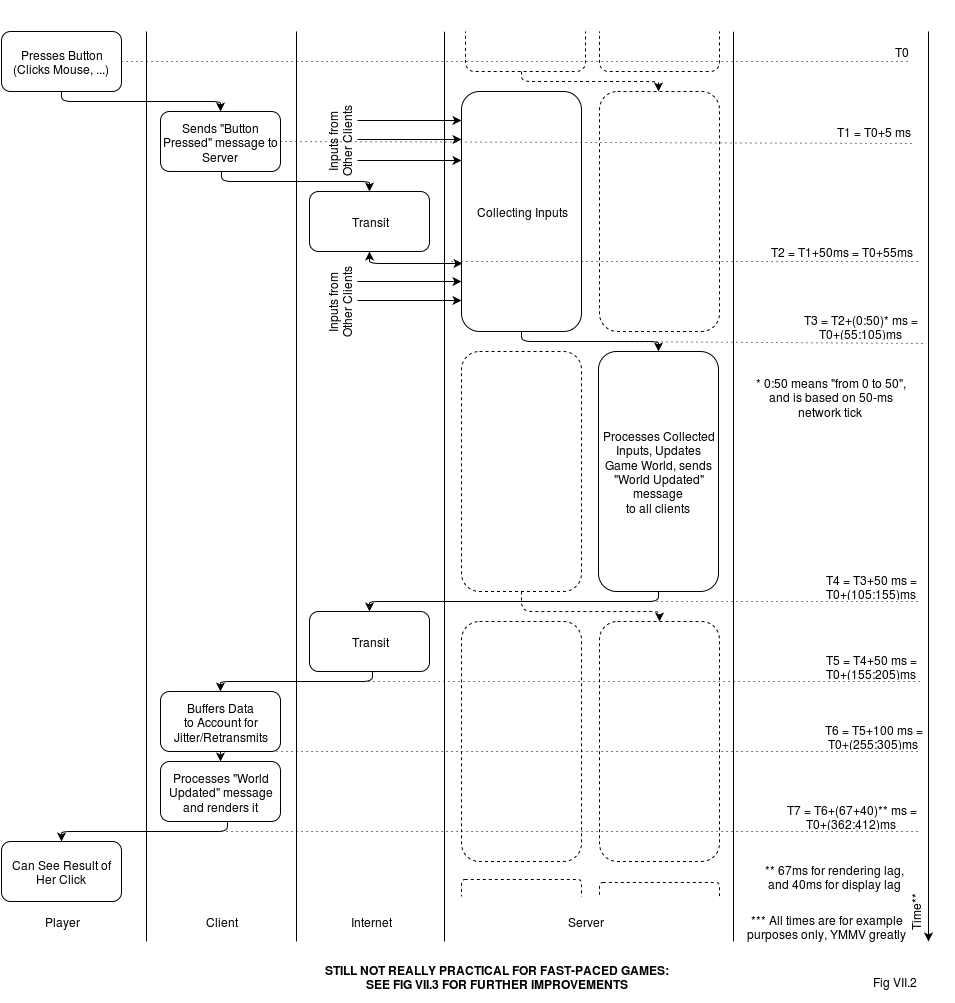
If we calculate all the delays on the way (using some not-too-unreasonable assumptions mentioned on Fig VII.2), we can see that for RTT=100ms overall delay reaches really annoying 350-400ms (as always, YMMV). As “normal” latency tolerances (as discussed above) are within 150-300ms, this in turn means that for the majority of fast-paced simulation games out there, implementing your system along the lines of this diagram will lead to really “laggy” player experience 🙁.
One additional problem with this approach is that we effectively have our visual frame rate equal to “network tick”; as “network ticks” are usually kept significantly lower than 60 per second (in our examples it was 20 per second) – it means that we'll be rendering at 20fps instead of 60fps, which is certainly not the best thing visually.
It leads us to the next iteration of our flow diagram, which introduces substantial (and non-trivial) client-side processing.
Data Flow Diagram, Take 3: Client-Side Prediction and Interpolation
Note: if your game is slow- or medium-paced (including casino-like games such as poker), you can safely skip this section too.
So, we have these two annoying problems: one is lag, and another one is client-side frame rate. To deal with them, we need to introduce some client-side processing. I won't go into too much details here; for further discussion please refer to the excellent series on the subject by Gabriel Gambetta: Gambetta; while he approaches it from a bit different side, all the techniques discussed are exactly the same.
Client-Side Interpolation
The first thing we can do, is related to the client-side update buffer (the one we have just introduced for Take 2). To make sure that we don't render at "network tick" rate (but rendering at 60fps instead), we can (and should) interpolate the data between the “current frame” (the last one within the update buffer), and “previous frame” in the update buffer. This will make the movement smoother and we'll get back our 60fps rendering rate. Such client-side interpolation is quite a trivial thing and doesn't lead to any substantial complications. On the negative side, while it does make movement smoother, it doesn't help to improve input lag ☹️.
Client-Side Extrapolation a.k.a. Dead Reckoning
The next thing we can do, is to go beyond interpolation, and to do some extrapolation.
The next thing we can do, is to go beyond interpolation, and to do some extrapolation. In other words, if we have not only object positions, but also velocities (which can be either transferred as a part of the "World Update" message or calculated on the client-side), then – in case if we don't have the next update yet because the packet got delayed – we can extrapolate the object movement to see where it would move if nothing unexpected happens.
The simplest form of such extrapolation can be done by simple calculation of x1=x0+v0, but can also be more complicated, taking into account, for example, acceleration. This is known as “dead reckoning”, though the latter term is used in several similar, but slightly different cases, so I'll keep using the term “extrapolation” for the specific thing described above.
The benefit of such extrapolation is that we can be more optimistic in our buffering, and not to account for the worst-case, when 3 packets are lost (extrapolating instead in such rare cases). In practice it often means (as usual, YMMV) that we can reduce the size of our buffer down to one outstanding frame (so at each moment we have both “current frame” and “previous frame”, but nothing else).
Running into the Wall, and Server Reconciliation
What if when we're extrapolating NPC's movement, he runs into the wall?
On the flip side, unlike interpolation, extrapolation causes significant complications. The first set of complications is about internal inconsistencies. What if when we're extrapolating NPC's movement, he runs into the wall? If this can realistically happen within our extrapolation, causing visible negative effects, we need to take it into account when extrapolating, and detect when our extrapolated NPC collides, and maybe even to start an appropriate animation. How far we want to go on this way – depends (see also "Client-Side Prediction" section below), but it MAY be necessary.
The second set of extrapolation-related issues is related to so-called “server reconciliation”. It happens when the update comes from the server, but our extrapolated position is different from server's one. This difference can happen even if we've faithfully replicated all the server-side logic on the client side, just because we didn't have enough information at the point of our extrapolation. For example, if one of the other players has pressed “jump” and this action has reached the server, on our client-side we won't know about it at least for another 100ms or so, and therefore our perfectly faithful extrapolation will lead to different results than the server's one. This is the point when we need to "reconcile" our vision of the "game world" with the server-side vision. And as our server is authoritative and is "always right", it is not that much a reconciliation in a traditional sense, but "we need to make client world look as we're told".
On the other hand, if we implement “server reconciliation” as a simple fix of coordinates whenever we get the authoritative server message, then we'll have a very unpleasant visual “jump” of the object between “current” and “new” positions. To avoid this, one common approach (instead of jumping your object to the received position) is to start new prediction (based on new coordinates) while continuing to run "current" prediction (based on currently displayed coordinates), and to display "blended" position for the "blending period" (with "blended" position moving from "current" prediction to "new" prediction over the tick). For example: displayed_position(dt) = current_predicted_position(dt) * (1-alpha(dt)) + new_predicted_position(dt) * alpha(dt), where alpha(t) = dt/BLENDING_PERIOD, and 0 <= dt < BLENDING_PERIOD.
[[TODO: other methods?]]
Client-Side Prediction
With client-side interpolation and client-side extrapolation, we can reduce latencies a bit; in our example on Fig. VII.2 we should be able to get back around 50ms (and also get real frame rate up to 60fps). However, even after these improvements it is likely that the game will feel “sluggish” (in our example, we'll have the overall input lag at 300+ms, which is still pretty bad, especially for a fast-paced game).
The idea here is to start moving player's own PC as soon as the player has pressed the button, eliminating this “sluggish” feeling completely.
To improve things further, it is common to use “Client-Side Prediction”. The idea here is to start moving player's own PC as soon as the player has pressed the button, eliminating this “sluggish” feeling completely. Indeed, within the client we do know what PC is doing – and can show it; and if we're careful enough, our prediction will be almost-the-same as the server authoritative calculation, at least until the PC is hit by something that has suddenly changed trajectory (or came out of nowhere) within these 300ms or so.
On the negative side, Client-Side Prediction causes quite serious discrepancies between “game world as seen by server” and “game world as seen and shown by client”. In a sense, it is similar to the “reconciliation problem” which we've discussed for “Client-Side Extrapolation”, but is usually more severe than that (due to significantly larger time gap between the extrapolation and reconciliation). One of the additional things to be kept in mind here, is that keeping a list of “outstanding” (not confirmed by server yet) input actions, and re-applying them after receiving every authoritative update is usually necessary, otherwise quite unpleasant visual effects can arise (see Gambetta.Part2 for further discussion of this phenomenon).
In addition, the problem of PC-running-into-the-wall (once again, in a manner similar to client-side extrapolation, but with more severe effects due to larger time gap) usually needs to be addressed.
To make it even more complicated, inter-player interactions can be not as well-predictable as we might want, so making irreversible decisions (like “the opponent is dead because I hit him and his health dropped below zero”) purely on the client side is usually not the best idea (what if he managed to drink a healing potion which you don't know about yet as the server didn't tell you about it?). In such cases it is better to keep the opponent alive on the client side for a few extra milliseconds, and to start the rugdoll animation only when the server does say he's really dead; otherwise visual effects like when he was starting to fall down, but then sprang back to life, can be very annoying.
Take 3 Diagram
Adding these three client-side things gets us to the following Fig VII.3: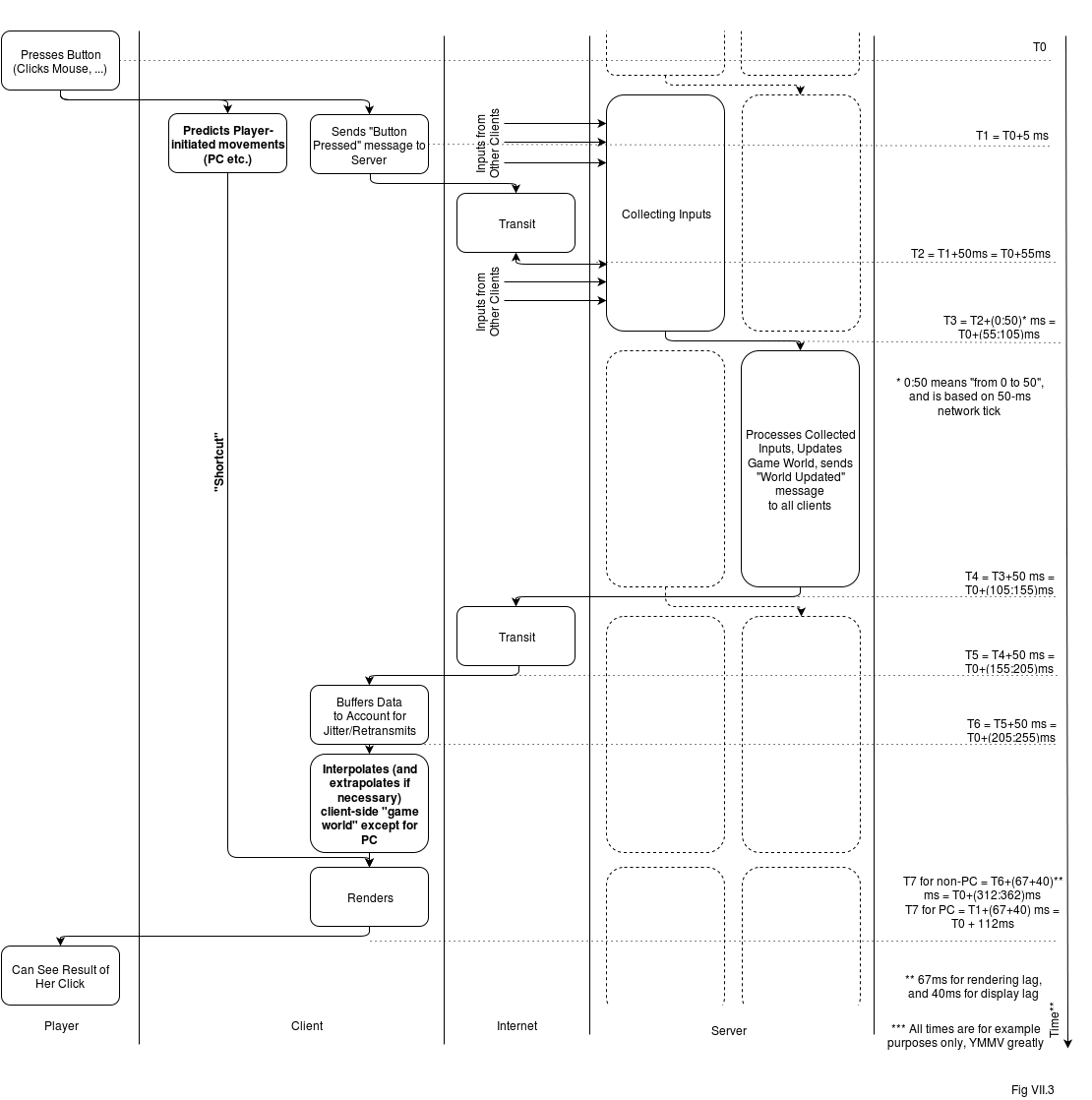 As we can see, processing of the authoritative data coming from server is still quite slow (despite an about 50ms improvement due to reducing size of client-side buffer, which became possible due to relying on client-side extrapolation when the server packet is delayed). But the main improvement in perceived responsiveness for those-actions-initiated-by-player (and it is these actions which cause the “laggish” feeling, as timing of the actions by the others is not that obvious) comes from the Client-Side Prediction “shortcut”. Client-Side Prediction is processed purely on the client-side, from receiving controller input, through client-side prediction, and directly into rendering, without going to server at all, which (as you might have expected) helps latency a damn lot. Of course, it is just a "prediction", but if it is 99% correct 99% of the time (and in the remaining cases the difference is not too bad) - it is visually ok.
The remaining problem is that there is still a significant (and unavoidable) lag between any update-made-by-server and the moment when our player will see it.
So, with Fig VII.3 (and especially with client-side prediction) we've managed got quite an improvement at least for those actions initiated by PC; at 112ms the game won't feel too sluggish. But can we say that with these numbers, everything is really good now? Well, sort of, but not exactly. The remaining problem is that there is still a significant (and unavoidable) lag between any update-made-by-server and the moment when our player will see it. This (as Gambetta.Part4 aptly puts it) is similar to living in the world where speed of light is slow, so we see what's going on, with a perceivable delay.
In turn, for some Really Fast-Paced games (think shooters) it leads to unpleasant scenarios when I'm as a player making a perfect shoot from a laser weapon, but I'm missing because I'm actually aiming at the position-of-the-other-player which I can see, and it is an inherently old position of the player (behind by 200ms or so even compared to server's authoritative world, and even more compared to his own vision). And this is the point where we're getting into realm of controversy, known as Lag Compensation.
Lag Compensation
The things we've discussed above, are very common, and are known to work well. The next thing, known as Lag Compensation (see also Gambetta.Part4), is much more controversial.
Lag Compensation is aimed to fix the problem outlined above, the one when I'm making a perfect shot, and missing because I'm actually aiming at the old position of the other player.
The idea behind Lag Compensation is that the server (keeping an authoritative copy of everything) can reconstruct the world at any moment, so when it receives your packet saying you're shooting with your timestamp (and all the other data such as angle at which you're aiming etc. etc.) , it can reconstruct the world at the moment of your shot (even according to your representation), and make a judgement whether you hit or missed, based on that information. This can be used to compensate for the delay, and therefore to make your “clean shots” much better.
On the other hand (in addition to some other oddities described in Gambetta.Part4), Lag Compensation is wide open to cheating 🙁 . If I can send my timestamp, and server will implicitly trust it – I am able to cheat the server, making the shot a bit later while pretending it was made a bit earlier.
In other words, Lag Compensation can be used to compensate not only for Network Lag, but also for Player Lag (poor player reaction), as they're pretty much indistinguishable from the server point of view
While effects of cheating can be mitigated to a certain extent by putting a limit on “how much client timestamp is allowed to differ from server timestamp”, it is still cheating (and as soon as the potential for cheating is gone, so is any benefit from compensation).
That's exactly why Lag Compensation is controversial, and I suggest to avoid it as long as possible. If you cannot avoid it – good luck, but be prepared to cheaters starting to abuse your game as soon as you're popular enough.
On the other hand, three client-side techniques above (Client-Side Interpolation, Client-Side Extrapolation, and Client-Side Prediction) do not make server trust the client, and are therefore inherently impossible to this kind of abuse.
There Are So Many Options! Which ones do I need?
With all these options on the table, an obvious question is "hey, what exactly do I need for my game?" Well, this is a Big Question, with no good answer until you try it for your specific game (over real link and/or over latency simulator). Still, there are some observations which may help to get a reasonable starting point:
- if your game is slow-paced or medium-paced (i.e. actions are in terms of "seconds") - all chances are that you'll be fine with the simplest dataflow (the one shown on Fig VII.1)
- if your game is MMORPG or MMOFPS - you'll likely need either the dataflow on Fig VII.2, or the one on Fig VII.3
- in this case, it is often better to start with the simpler one from Fig VII.2 and add things (such as Client-Side Interpolation, Client-Side Extrapolation, Client-Side Prediction) gradually, to see if you've already got the feel you want without going into too much complications
- if after adding all the "Client-Side *" stuff you still have issues - you may need to consider Lag Compensation, but beware of cheaters!
- for really serious development, you may need to go beyond these techniques (and/or combine them in unusual ways), but these will probably be too game-specific to discuss them here. In any case, what can be said for sure is that you certainly need to know about the ones discussed in this Chapter, before trying to invent something else 🙂 .
[[To Be Continued...

This concludes beta Chapter 3(a) from the upcoming book "Development and Deployment of Massively Multiplayer Games (from social games to MMOFPS, with social games in between)". Stay tuned for beta Chapter 3(b), "Publishable State"]]
References
[Wikipedia.InputLag] "Input Lag", Wikipedia
[LippsEtAl] David B. Lipps, Andrzej T. Galecki, James A. Ashton-Miller, "On the Implications of a Sex Difference in the Reaction Times of Sprinters at the Beijing Olympics", PLOS ONE
[TomsHardware.GraphicsCardsMyths] Filippo L. Scognamiglio Pasini, "The Myths Of Graphics Card Performance: Debunked", tom's Hardware
[Leadbetter2009] Richard Leadbetter, "Console Gaming: The Lag Factor"
[DisplayLag.Display-Database] "Display Input Lag Database"
[Wikipedia.InternetExchanges] "List of Internet exchange points by size"
[Grigorik2013] Ilya Grigorik, "High Performance Browser Networking"
[GafferOnGames.DeterministicLockstep] Glenn Fiedler, "Deterministic Lockstep"
[Gambetta] Gabriel Gambetta, "Fast-Paced Multiplayer"
[Gambetta.Part2] Gabriel Gambetta, "Fast-Paced Multiplayer (Part II): Client-Side Prediction and Server Reconciliation"
[Gambetta.Part4] GabrielGambetta, "Fast-Paced Multiplayer (Part IV): Headshot! (AKA Lag Compensation)"


Comments